

Pre-sales customer service WeChat


ZEBRA Zebra Barcode Printer Purchase Guide
Release Time:2017-06-22
When choosing a barcode printer, you need to consider the following issues: the number of prints, the size of the printed label, the content of the printed label, the speed of printing, and the application in different industries. ZEBRAzebra barcode printer shopping guide, hongxing wynn finishing to provide reference!
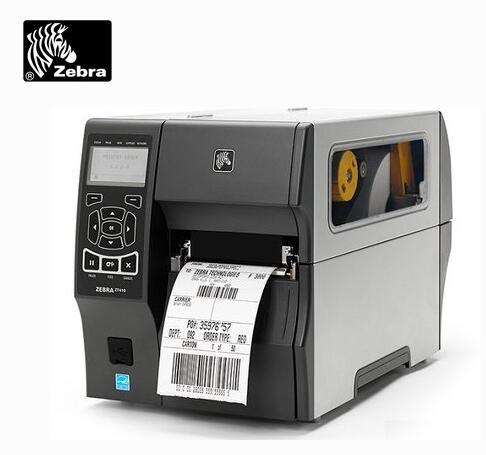
Zebra Barcode Printer Features
Zebra printers are known for their reliable quality and durability. Zebra (Zebra) barcode printer its lightweight and metal shell, not only can move, but also can resist the harsh environment, its new built-in reel function, but also can be printed labels back reel, to avoid contamination.
Zebra barcode printers have good performance in terms of printing effect and speed, but there are still customers who have neglected some steps and caused printing problems. In fact, most of the problems can be avoided.
Quantity
If you need to print more than 1000 labels a day, you need a solid, high-volume XiII series printer with a metal housing. If the number of prints is small, desktop personal printer series can be used, such as S500,S300 zebra barcode printer, etc.
Size
General bar code printers can print 4 "X6" labels, which is in line with the current specifications of shipping labels. You can also flexibly print labels of different sizes according to your needs. If you need to print wider labels, you can choose 170XiII and 220XiII models.
Content
If you only need to print barcodes and text, the general zebra barcode printer can be competent. But if you need to print different barcodes (such as item numbers) or text (such as shipping labels) on each label, and you don't want to stop printing halfway, you need a printer with a 32-bit processor, which can greatly improve production efficiency. In addition, if you want to print high-quality images on the label, you can consider using a 300dpi print head for better results.
Speed
Different styles of printers have different printing speeds, and zebra barcode printers need to be based on the user's requirements for speed. General bar code printer printing speed of 2 "-6" per second, and higher speed printers (such as XiII series) can print 8 "-12" per second, if you need to print a large number of labels in a short time, high-speed printers are more suitable.
Application
Printers used on the production line or in the warehouse should choose a more robust model with a metal shell, such as 105Se and xiII series; and desktop personal printer series can be selected at the point of sale or in the office, such as S500,S300, etc., because it requires less space and is easy to move.
The most common problem with zebra printers is the deviation of the printing position. The user should pay attention to the first printing or printing different sizes of labels, first to adjust the size of the label required, otherwise the printing position will be offset. In fact, the label size adjustment of zebra bar code printer is very simple. All types of zebra printers are equipped with automatic adjustment function. Users only need to press the correction key on the control board, and the printer will detect the size of the label by itself to ensure that the printing position of zebra bar code printer is accurate.
Another common problem is that the bottom paper of the label is too thick, so that the printer's sense zebra bar code printer should be unable to detect the size of the label. When encountering the above situation, the user should choose the label with thinner bottom paper. Of course, the label paper provided by Zebra is the most ideal effect, and it can greatly reduce the printing damage caused by poor label quality.
Shenzhen Hongxing Yongli Electronic Technology Co., Ltd. [www.xingyongli.com] is a zebra printer diamond agent and a supplier of Shenzhen zebra printer products. 0755-28225517
Focus on us
Official Account
Pre Sales
After Sales
National Service Hotline
Complaint suggestion:+86 13530144755
Enterprise E-mail:wanglili@xingyongli.com
Links:Shenzhen Hongxing Yongli Electronic Technology Co., Ltd.(Apply for friend chain plus QQ:2355671558)
©2024 Shenzhen Hongxing Yongli Electronic Technology Co., Ltd Powered by www.300.cn