

Pre-sales customer service WeChat


ZC300 Card Printer
Key words:
Classification:
Detailed description
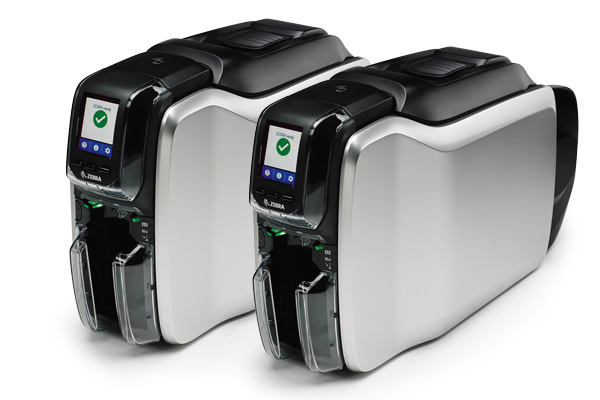
The ZC300 provides highly intuitive and tested icons, animations, and text-based messages (displayed in your language), making it easy for different users to understand printer needs and how to perform a variety of functions, including how to solve printer jams, install a carbon tape, load a carbon tape or card, and more.
The card feeder is advanced in design and can handle cards of different thicknesses when busy.
The card feeder can be quickly adjusted according to the thickness of different cards-reducing the adjustment of different types of cards.
Simple deployment, insert available
The ZC300 is available out of the box. Reduce time-consuming and complex installation steps, and can be inserted out of the box.
Advanced drivers that complement the graphical user interface
The well-designed driver integration visualizes the interface, making card printing easier. We have logically grouped settings in different tabs for easy one-click access. Card visualization features are friendly, simple monochrome card printing or complex color card printing is also easy, allowing you to quickly preview the appearance of the card, reducing the time and cost of repeated printing test cards.
Advanced card slot design
The printer card slot has been redesigned to make card loading and unloading easier and more efficient. The card slot adopts the design style of box-type minivan, and can directly grab a single card or multiple cards. The capacity of the card slot is the same as that of the card slot, reducing the need to refill and empty the card slot.
Simple carbon ribbon replacement process
Replacing the carbon tape is very simple, reducing the need for instructions. The carbon belt door latch is well designed and can be opened when unlocked. The door handle allows you to easily understand how to remove or insert the carbon tape. The printer also integrates an embedded smart chip that lets you know when to replace the ribbon.
Recommend Products
Online Consultation
* Note: Please fill in the information accurately and keep the communication unblocked. We will contact you as soon as possible
Focus on us
Official Account
Pre Sales
After Sales
National Service Hotline
Complaint suggestion:+86 13530144755
Enterprise E-mail:wanglili@xingyongli.com
Links:Shenzhen Hongxing Yongli Electronic Technology Co., Ltd.(Apply for friend chain plus QQ:2355671558)
©2024 Shenzhen Hongxing Yongli Electronic Technology Co., Ltd Powered by www.300.cn