

Pre-sales customer service WeChat


Picking a suitable barcode printer takes only three minutes
Release Time:2018-08-16
Choosing the right printer is not as overwhelming as when the printer first came out. It only takes three minutes to pick a suitable barcode printer. By specifying the barcode function and answering a few simple questions, users can greatly narrow the range of printer choices. The main questions to ask are:
1. What is the intended use of the barcode label?
2. Where will the printer be placed?
3. In which environment will the printer operate (temperature fluctuations, vibration, high humidity, exposure to chemicals, etc.)?
4. What is the expected working cycle of the printer?
Is there a minimum speed requirement?
6. What is the size of the label to be used?
7. What is the frequency of label specification changes?
8. In what environments (temperature fluctuations, wear, high humidity, exposure to chemicals, etc.) will the label be used?
9. Will the printer be connected to the network or a separate terminal?
10. What is the budget for the project?
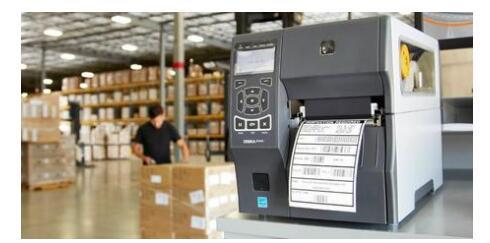
Other performance indicators include:
Printer durability
For example, some Zebra printers are designed for harsh industrial environments and come with a sealed case to prevent dust from interfering with their use. The rugged desktop printer is ideal for light industrial, commercial and office use.
Print volume
What is your daily label output? For example, Zebra's high-performance Xi series printers can work continuously during peak printing periods or run 24 hours a day. Other models are more suitable for small batch intermittent printing. The printing speed is also a factor in meeting the print volume requirement.
Print Speed
If you need to print labels in large quantities every day or during peak periods, print speed is an important consideration. Print speed is a "throughput" element that refers to the time elapsed between receiving a print command and completing the print flow. Throughput depends not only on printing time, but also on label formatting time (I. e., the time required to convert the program and data into an image on the label). Depending on the complexity of the label format and the ability of the printer to process this information in an efficient manner, the label formatting time can sometimes cause significant printing delays, affecting the overall print speed of the printer. If this delay occurs in a production environment that focuses on time and on-demand printing capabilities, it can greatly impair productivity.
Label Image Durability
If you need to keep a clear, durable image for years, heat transfer is the only option. In contrast, thermal printers are ideal for short-term applications, that is, labels only need to be stored for a limited time-anywhere from a week to a year. Heat sensitive is not as durable as heat transfer, especially when exposed to direct sunlight or when used in a chemical environment. The types of paper that can be used for thermal are also limited compared to the types of paper that can be used for thermal transfer printers.
Print Resolution
Depending on your application, a higher resolution (expressed in dots per inch or dpi) may be required to easily print text and barcodes on very small labels (for example, labels commonly used for components or specimens in the electronics or pharmaceutical industries). A higher print resolution can clearly print a lot of detailed information in a small space without affecting the readability of the scanner. Although many Zebra printers have a resolution of 203 dpi, which is sufficient for most common applications, some models can also provide high resolution of 300 dpi or even 600 dpi to meet the needs of limited national asset tags or applications that require high-resolution text and graphics.
Print Width
Another consideration in choosing a printer is to determine the maximum width of the label you need to print. For example, Zebra thermal printers can provide a variety of maximum print widths, from 2 inches (for mobile printers and some desktop printers) to 8.5 inches (for printing 8.5-inch x 11-inch packing slips and invoices, which is faster and cheaper than laser printing). If your application requires large labels (for example, shipping labels, multiple invoices, labels on large products and packaging, chemical drums, or pallet packaging), choose a wide-format label printer with a print width of 6 inches or more.
Printer function options
Other factors to consider when purchasing a particular thermal printer are its available options. These options may include: Different print modes: Label Cutter, Peel, Liner Roll, Tear, Rewind, etc. A real-time clock that displays the printing time and expiration date. An early warning counter that alerts the user to change media, perform preventive maintenance, etc. Communication options: parallel port, serial port, USB interface, wired or wireless Ethernet, twinaxial or coaxial cable, etc. Memory options: PCMCIA/Flash, upgradeable DRAM.? Font options: Scalable fonts and bitmap fonts, non-Roman Asian font sets for international characters, such as Chinese, Japanese, TrueType fonts, and so on.
Any of the above options can help the printer better meet application requirements and improve user productivity. For example, the peel mode option is advantageous for speeding up label application. In peel-off mode, the printer separates the label from the backing paper, so users can easily remove the label and stick it without manually peeling it off. These time-saving options can greatly facilitate label output and, in some cases, even increase worker motivation.
Focus on us
Official Account
Pre Sales
After Sales
National Service Hotline
Complaint suggestion:+86 13530144755
Enterprise E-mail:wanglili@xingyongli.com
Links:Shenzhen Hongxing Yongli Electronic Technology Co., Ltd.(Apply for friend chain plus QQ:2355671558)
©2024 Shenzhen Hongxing Yongli Electronic Technology Co., Ltd Powered by www.300.cn