

Pre-sales customer service WeChat


How to detect whether the barcode scanning gun can be used
Release Time:2017-08-31
How to check whether the barcode scanning gun can be used? In general, the barcode scanning gun will be equipped with instructions when purchasing, please refer to the instructions to see whether the driver needs to be installed. At present, most bar code scanning guns do not need to be installed and driven, and can be used directly on the computer.
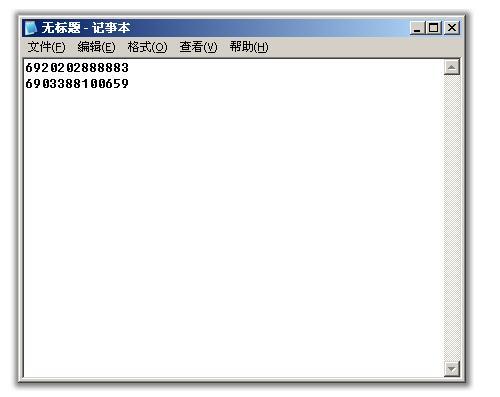
Whether it is USB interface, serial port (9-pin port) or keyboard port, as long as it is plugged into the computer (if necessary, please install the driver), the indicator light of the barcode scanning gun will light up. After scanning the bar code, it will produce a tick sound. Please open Notepad or where you can enter words (like Word or Excel), and then scan a barcode to see if the barcode number will appear. If the bar code number appears on the computer, it means that the bar code scanning gun is normal and can be used. Otherwise, please check where the problem is. If necessary, contact the supplier of the scanner to resolve the issue.
As shown below, after scanning the goods, it will be displayed in Notepad:
Focus on us
Official Account
Pre Sales
After Sales
National Service Hotline
Complaint suggestion:+86 13530144755
Enterprise E-mail:wanglili@xingyongli.com
Links:Shenzhen Hongxing Yongli Electronic Technology Co., Ltd.(Apply for friend chain plus QQ:2355671558)
©2024 Shenzhen Hongxing Yongli Electronic Technology Co., Ltd Powered by www.300.cn