

Pre-sales customer service WeChat


What software or driver does the barcode scanning gun need to be installed?
Release Time:2020-07-29
"The barcode scanning gun is plug and play, and there is no need to install any drivers or software at all". But when you buy a barcode scanning gun and face a string of numbers scanned on the computer screen, you find that you don't know what to do next. In fact, I guess your question may not be accurate, you may be the advice, "barcode scanning gun also need to cooperate with what other software to use together?" so that the suppliers will answer, "Oh, it depends on the nature of your industry, such as supermarkets, you may also need to purchase a purchase and sale software" and so on. Below one for your analysis.
First of all, the use of bar code scanning gun is very simple, as shown in the figure above, bar code scanning gun is generally divided into three kinds of interface, respectively, USB interface, serial port and keyboard port. You don't have to struggle with the interface, just choose the interface suitable for you, that is to say, you can choose what interface you have on your computer or other equipment. In most cases, most users use USB interface.
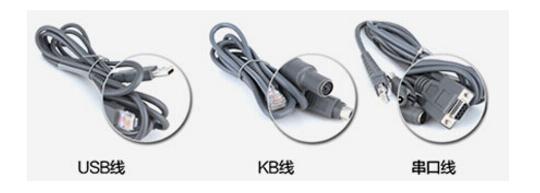
The use of USB bar code scanning gun operation method will generally be divided into the following steps,
1) First, connect the data line to the data line socket of the barcode scanning gun and the USB port of the computer (the connection mode of the scanning gun of other interfaces is slightly different, please refer to the user manual for details).
2) Press and hold the trigger button, the lighting lamp is activated, and red lighting area and red focus line appear.
3) Align the red focus line with the center of the barcode, move the scanning gun and adjust the distance between it and the barcode to find the best reading distance.
4) When the success tone is heard and the red lighting line is turned off, the code reading is successful, and the scanning gun transmits the decoded data to the host.
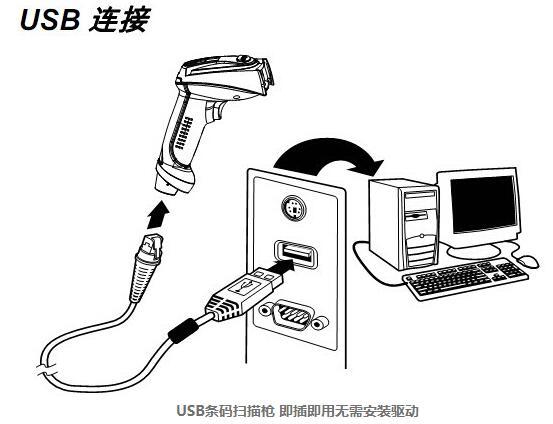
USB barcode scanner plug and play without driver installation
From the above point of view, the bar code scanning gun function is to replace the manual input, more convenient and quick. Simply put, it is equivalent to a keyboard, which is an input tool. It just scans the numbers in the barcode and displays them on the computer and other terminals. Not as non-professionals think, you can immediately see the information about the bar code representative (name, price, etc.) after scanning the bar code. This information needs to be displayed with the help of other software, and this software needs to be selected according to your products. Different products are equipped with different software, such as clothing, medicine, supermarkets and other industries, and different software in different industries will also be distinguished.
After the software is installed, enter the background management interface of the software and save all your commodities here in the commodity information option: scan the barcode of your product with a scanning gun in the item of commodity barcode, then save the name and price of the commodity, and then you can sell it. Next, we will enter the front desk sales interface of the software, scan the bar code with the bar code scanning gun, and the above will automatically display the product name, price and other information, and then collect the money.
The above is the use of bar code scanning gun and software installation method, with the development of bar code technology, now there are hundreds of scanning gun brands in the market, scanning gun prices are also high and low. Please consult your barcode scanning gun supplier customer service!
Focus on us
Official Account
Pre Sales
After Sales
National Service Hotline
Complaint suggestion:+86 13530144755
Enterprise E-mail:wanglili@xingyongli.com
Links:Shenzhen Hongxing Yongli Electronic Technology Co., Ltd.(Apply for friend chain plus QQ:2355671558)
©2024 Shenzhen Hongxing Yongli Electronic Technology Co., Ltd Powered by www.300.cn