

Pre-sales customer service WeChat


How to Set the Barcode Sensing Mode of a Honeywell Scanner
Release Time:2020-07-21
The instructions of Honeywell scanning guns are all in English, and I have not seen the Chinese version so far. First of all, ensure that the scanning gun has been set up and the power supply has been connected. How to set the barcode induction mode of Honeywell scanning gun is provided by Hongxing Yongli Technology Arrangement!
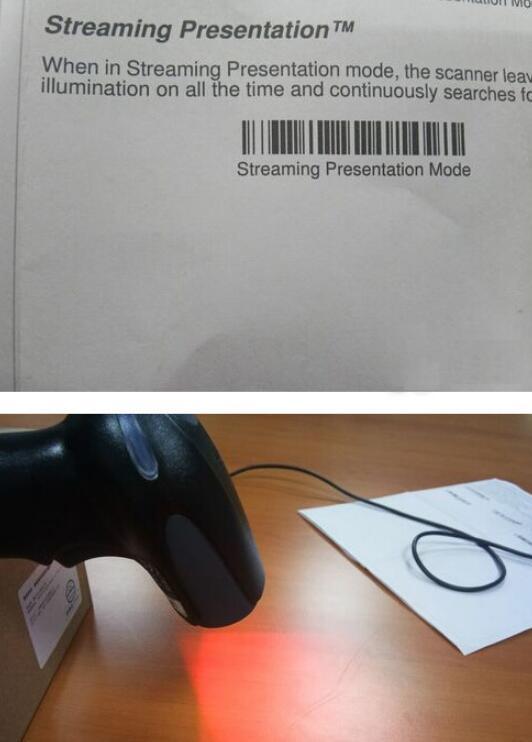
The induction barcode setting of Honeywell 1900 scanning gun: as long as the barcode is sensed, the scanning line will be displayed and the barcode information will be scanned. When there is no barcode, the scanning gun only emits red light and there is no scanning line. If you don't want to use this induction mode, you can convert it by scanning the corresponding set bar code. (The above barcode induction mode setting code needs to be saved before printing before scanning and setting.) The full Honeywell scanning gun manual needs to contact the supplier to provide you with it.
Focus on us
Official Account
Pre Sales
After Sales
National Service Hotline
Complaint suggestion:+86 13530144755
Enterprise E-mail:wanglili@xingyongli.com
Links:Shenzhen Hongxing Yongli Electronic Technology Co., Ltd.(Apply for friend chain plus QQ:2355671558)
©2024 Shenzhen Hongxing Yongli Electronic Technology Co., Ltd Powered by www.300.cn