

Pre-sales customer service WeChat


Method for Zebra Printer to Print Chinese Characters
Release Time:2020-07-21
The use of bar code printers needs to be coordinated with bar code editing software. Zebra printers need to print Chinese characters. Hongxing Yongli bar code editor summarizes the following methods, hoping to help people in need.
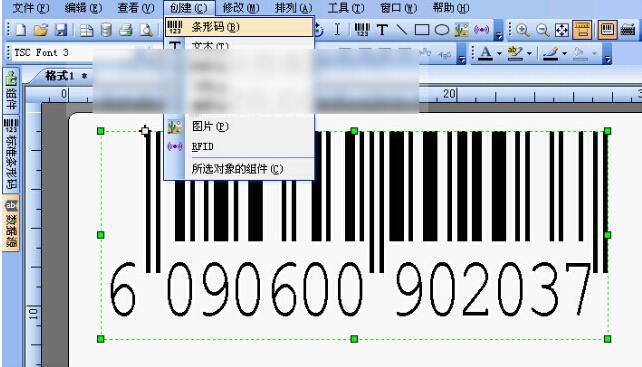
Use professional barcode label design software, such as CODESOFT, BarTender, BAR-ONE, etc., but they are not free. You can get a free BARONE simple version of the software: BAR-ONE LITE from the CD that the Zebra ZEBRA printer carries randomly. BAR-ONE LITE software can print Chinese, graphics, bar codes, wireframes, etc. The data source can be continuous numbers, various data combinations, dialog box input, system date and system time, etc. The biggest difference between BAR-ONE and the paid version is that the database cannot be used.
Using professional barcode label design software to print Chinese can save a lot of trouble. The position and size of Chinese characters can be adjusted according to their own needs. The disadvantage is that if there are many printed Chinese characters or when the Chinese characters are large, the data transmission time is relatively long, and there may be data overflow, adding memory to the printer. However, using parallel communication can alleviate this problem. The use of bar code software is suitable for customers who do not have programming ability and often have to modify the label format.
2, through the driver to write their own printing software, such as VB to write printing software, this need to have a programming base of customers. In fact, the method of programming with ZEBRA printer driver is the same. You can set the font, size and position of Chinese characters to be printed through some statements and controls. As long as you add a Zebra ZEBRA printer to your computer and install the driver, set it as the default printer, you can program and control the ZEBRA printer to print. And after you set the ZEBRA printer as the default printer, you will see some barcode characters in the font table of WORD or tablet. You can use these barcode fonts to print barcodes.
The advantage of this method is that you can write your own applications and use the Chinese characters that come with the WINDOWS. The disadvantage is that you need technicians who know how to program, the printing position is not easy to adjust, the label format is not easy to modify, and the problems encountered in the first method will also occur when there are many or large Chinese characters printed. So it is suitable for customers who need to embed the printing program into their own system, or need to have their own independent printing.
3. Using the printer to instruct ZPLII language to print Chinese characters requires the support of the Chinese character hard font library of the barcode printer, and it is also possible without the hard font library, but the method is very complicated and difficult to operate. The memory of ZEBRA printer itself has some bar code fonts and English fonts. These bar codes and English can be printed directly through ZPLII language, so the transmission speed of ZEBRA printer is very fast when printing bar codes and characters. The standard memory of ZEBRA printer does not have a Chinese character library, and ZPLII language cannot be used to directly control the printing of Chinese characters. Therefore, when printing Chinese characters, the computer needs to convert Chinese characters into graphics and then transmit them to the printer. When the amount of transmitted data is large, the transmission time is relatively long. Moreover, when the printed Chinese characters are much larger, it is very easy to cause the data overflow of the printer, so the transmitted data should be reduced, to shorten the transmission time, zebra Zebra barcode printer needs to be equipped with Chinese character hard character library.
There are two ways to add hard font to zebra ZEBRA barcode printer: one is to install FLASH chip and the other is to install PCMCIA card. S400 printer can be equipped with 8M FLASH memory, Z4M printer can be equipped with 1M or 2M FLASH chip, or 8M PCMCIA card (card slot is also installed),XiIII printer has 1.5M FLASH chip (blank when leaving the factory, word library needs to be downloaded), and 8M PCMCIA card can be installed. It is worth noting that the FLASH chip can only have dot matrix Chinese characters, and the PCMCIA card can have vector Chinese characters.
The advantage of this method is that when printing Chinese characters, the transmission speed is fast and the programming is simple. It can be printed as long as the corresponding ZPLII instruction is sent to the transmission port of the printer. The disadvantage is that the Chinese character font is relatively single. Due to the small capacity of the hard character library, it can only bring one Chinese character font, so it is suitable for customers who require fast printing speed. In the process of using, you can choose which way to print Chinese according to your own needs.
Focus on us
Official Account
Pre Sales
After Sales
National Service Hotline
Complaint suggestion:+86 13530144755
Enterprise E-mail:wanglili@xingyongli.com
Links:Shenzhen Hongxing Yongli Electronic Technology Co., Ltd.(Apply for friend chain plus QQ:2355671558)
©2024 Shenzhen Hongxing Yongli Electronic Technology Co., Ltd Powered by www.300.cn