

Pre-sales customer service WeChat


Intermec inventory machine wifi settings
Release Time:2020-07-21
Intermec the wifi settings of the inventory machine, the tutorial on how to connect the Itenmai data collector to wifi, Hongxing Yongli collates the training materials of the previous technical department for your reference. For technical questions, please consult: 0755-28225517-8036 Wang Gong
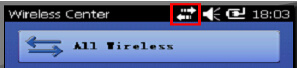
Screenshot of wifi function page of Itenmai Collector
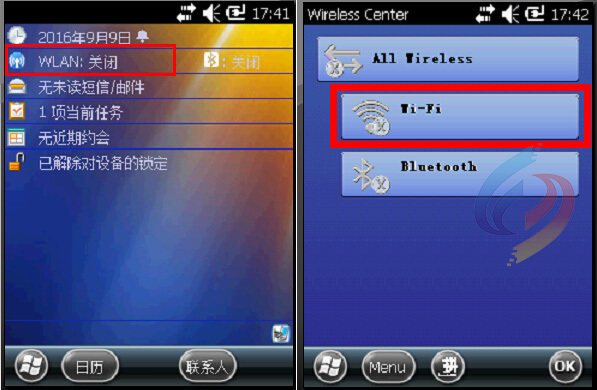
If WIFI is gray, click on WIFI icon
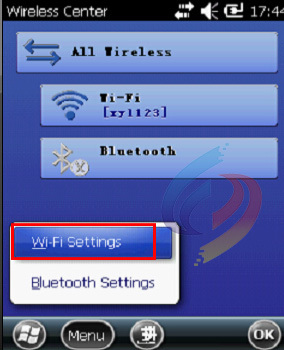
Click Menu below -->Wi-Fi Settings
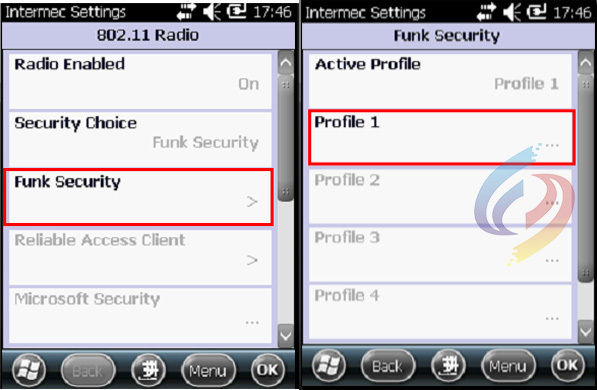
Click on the Funk Security --> Profile 1
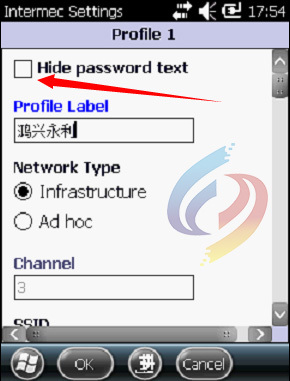
In this interface, the check box at the top should be removed, then the Profile Label position can use the default value without change, the Network Type option does not need to be changed, the Channel does not need to be changed, and then the scroll bar is pulled down.
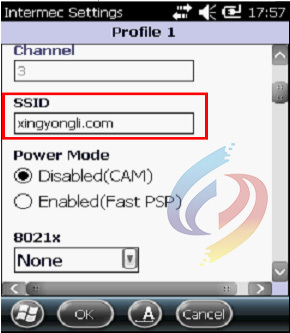
SSID: Fill in the actual WIFI name here, Power Mode does not need to be set. 8021x settings are not explained in detail here. Continue the scroll bar down.
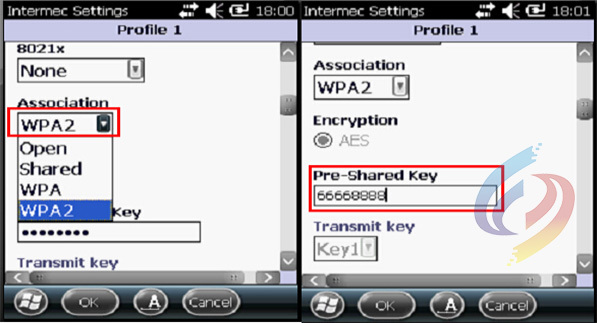
Association: Select the signal encryption method here. WPA and WPA2 must be distinguished. Select which mode depending on the actual encryption method. After selection, enter the password, click OK after completion, and return
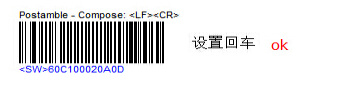
Attached: The scanning head of Etenmai PDA EX25 is set with carriage return barcode: the following barcode can be directly scanned by PDA.
Focus on us
Official Account
Pre Sales
After Sales
National Service Hotline
Complaint suggestion:+86 13530144755
Enterprise E-mail:wanglili@xingyongli.com
Links:Shenzhen Hongxing Yongli Electronic Technology Co., Ltd.(Apply for friend chain plus QQ:2355671558)
©2024 Shenzhen Hongxing Yongli Electronic Technology Co., Ltd Powered by www.300.cn