

Pre-sales customer service WeChat


The reason why blank paper jumps when the bar code machine prints.
Release Time:2015-06-04
When the bar code machine prints, there is a reason for jumping out of blank paper, and the position of the printed label is also wrong, which indicates that the printer paper detector has not correctly detected the label paper. In response to this situation, Hongxing Yongli summarized the reasons for this situation, hoping to help the majority of users.
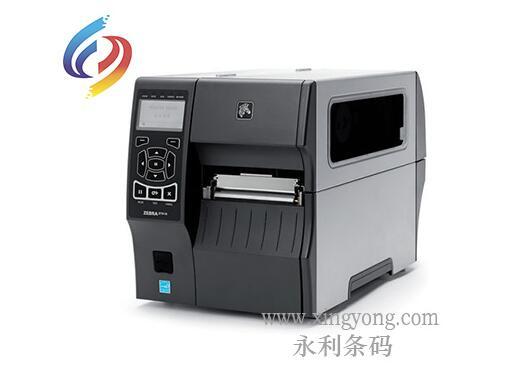
Zebra barcode printer equipment
1. check the installation of printer ribbon and label paper.
First of all, it is necessary to make sure that the printer's carbon tape and label paper match each other: whether the carbon tape supports printing this label and whether it can be used on this type of printer.
Secondly, it is necessary to check whether the carbon ribbon or ribbon is installed backwards. If it is installed backwards, there will be a situation where the content cannot be printed.
Finally, if there is no problem with the printer installation, test the paper on the printer to see if the paper can be fed normally and if there is any content on the paper. If there is no content on the paper normally, continue the following test.
Please re-install the label against the steps on the included Quick Install Guide.
2. paper sensor position incorrect
After lifting the print head, you will see that there will be a paper detector where the paper passes through. Refer to Figure ①. The detector needs to be covered by paper so that the printer can correctly know the size of the paper:
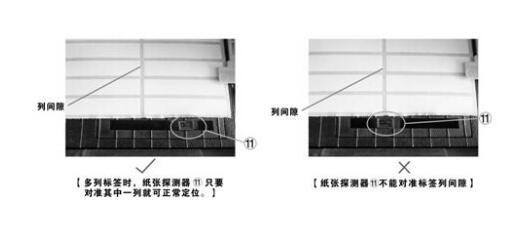
Figure ①
3. label setting is inconsistent with actual size
In the "Paper" tab of the "Page Setup" in the label editing software, the "Height" setting does not match the actual label height (Figure ②). Please use a ruler to measure the actual height of the label before printing, and then set the label correctly.
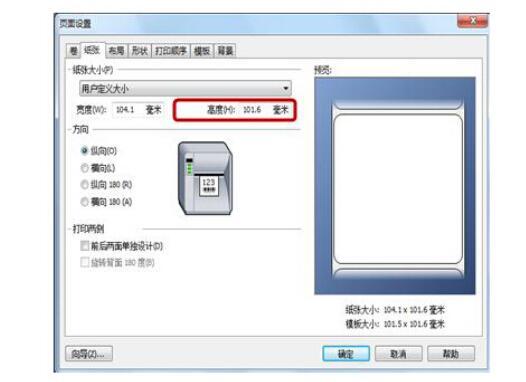
Figure ②
4. barcode machine paper sensor dirty
1. Please clean the paper sensor with absolute alcohol.
Note: To clean the sensor, turn off the printer power first.
2. Do the "paper detection" operation again. Follow these steps to calibrate your label (only for post -09 machines):
① In the standby state, press the FEED button and hold it for 3 seconds, the 3 LED indicators will flash at the same time;
The machine automatically paper (about 20cm), and then stop to the normal tearing position;
③ The 3 LED indicator lights stop flashing and return to normal state, and the operation is completed.
5. label paper gap is not standardized
When some label paper is processed, due to the machine or mold, the size or interval of the produced label paper is inconsistent, resulting in the printer not being able to sense the size of the label paper, so there will be continuous blank paper.
Incorrect 6. media type setting
The correct media type is not selected in the drive. For example, "spaced label" needs to be selected for spaced label paper, "marked label" needs to be selected for perforated label, and "continuous" paper needs to be selected for the media type of continuous paper. Refer to the following figure:
The 7. label backing paper is too thick or the label paper is irregular.
If the label paper is thickened and the backing paper is very thick, or some electronic labels are very irregular, the printer will not be able to sense the size of the paper, which will also lead to blank paper or paper jumping.
If the above barcode machine printing appears blank paper jumping reasons and solutions are ruled out or not, it is best to contact the product supply service provider, or contact Shenzhen Hongxing Yongli to help solve!
Focus on us
Official Account
Pre Sales
After Sales
National Service Hotline
Complaint suggestion:+86 13530144755
Enterprise E-mail:wanglili@xingyongli.com
Links:Shenzhen Hongxing Yongli Electronic Technology Co., Ltd.(Apply for friend chain plus QQ:2355671558)
©2024 Shenzhen Hongxing Yongli Electronic Technology Co., Ltd Powered by www.300.cn